.jpeg)
Table of Contents
This is the H1 title
H1 titles are ignored in the table of contents. We always start the table of contents links with H2.
The best part about H2 elements
A rich text element can be used with static or dynamic content. For static content, just drop it into any page and begin editing. For dynamic content, add a rich text field to any collection and then connect a rich text element to that field in the settings panel. Voila! Headings, paragraphs, blockquotes, figures, images, and figure captions can all be styled after a class is added to the rich text element using the "When inside of" nested selector system.
A rich text element can be used with static or dynamic content. For static content, just drop it into any page and begin editing. For dynamic content, add a rich text field to any collection and then connect a rich text element to that field in the settings panel. Voila! Headings, paragraphs, blockquotes, figures, images, and figure captions can all be styled after a class is added to the rich text element using the "When inside of" nested selector system.
H3 is one number lower than H2
A rich text element can be used with static or dynamic content. For static content, just drop it into any page and begin editing. For dynamic content, add a rich text field to any collection and then connect a rich text element to that field in the settings panel. Voila! Headings, paragraphs, blockquotes, figures, images, and figure captions can all be styled after a class is added to the rich text element using the "When inside of" nested selector system.
And now back to H2
A rich text element can be used with static or dynamic content. For static content, just drop it into any page and begin editing. For dynamic content, add a rich text field to any collection and then connect a rich text element to that field in the settings panel. Voila! Headings, paragraphs, blockquotes, figures, images, and figure captions can all be styled after a class is added to the rich text element using the "When inside of" nested selector system.
A rich text element can be used with static or dynamic content. For static content, just drop it into any page and begin editing. For dynamic content, add a rich text field to any collection and then connect a rich text element to that field in the settings panel. Voila! Headings, paragraphs, blockquotes, figures, images, and figure captions can all be styled after a class is added to the rich text element using the "When inside of" nested selector system.
H3 is one number lower than H2
A rich text element can be used with static or dynamic content. For static content, just drop it into any page and begin editing. For dynamic content, add a rich text field to any collection and then connect a rich text element to that field in the settings panel. Voila! Headings, paragraphs, blockquotes, figures, images, and figure captions can all be styled after a class is added to the rich text element using the "When inside of" nested selector system.
A rich text element can be used with static or dynamic content. For static content, just drop it into any page and begin editing. For dynamic content, add a rich text field to any collection and then connect a rich text element to that field in the settings panel. Voila! Headings, paragraphs, blockquotes, figures, images, and figure captions can all be styled after a class is added to the rich text element using the "When inside of" nested selector system.
I'm an H4 chilling under an H3
A rich text element can be used with static or dynamic content. For static content, just drop it into any page and begin editing. For dynamic content, add a rich text field to any collection and then connect a rich text element to that field in the settings panel. Voila! Headings, paragraphs, blockquotes, figures, images, and figure captions can all be styled after a class is added to the rich text element using the "When inside of" nested selector system.
A rich text element can be used with static or dynamic content. For static content, just drop it into any page and begin editing. For dynamic content, add a rich text field to any collection and then connect a rich text element to that field in the settings panel. Voila! Headings, paragraphs, blockquotes, figures, images, and figure captions can all be styled after a class is added to the rich text element using the "When inside of" nested selector system.
A rich text element can be used with static or dynamic content. For static content, just drop it into any page and begin editing. For dynamic content, add a rich text field to any collection and then connect a rich text element to that field in the settings panel. Voila! Headings, paragraphs, blockquotes, figures, images, and figure captions can all be styled after a class is added to the rich text element using the "When inside of" nested selector system.
Another H2 here
A rich text element can be used with static or dynamic content. For static content, just drop it into any page and begin editing. For dynamic content, add a rich text field to any collection and then connect a rich text element to that field in the settings panel. Voila! Headings, paragraphs, blockquotes, figures, images, and figure captions can all be styled after a class is added to the rich text element using the "When inside of" nested selector system.
A rich text element can be used with static or dynamic content. For static content, just drop it into any page and begin editing. For dynamic content, add a rich text field to any collection and then connect a rich text element to that field in the settings panel. Voila! Headings, paragraphs, blockquotes, figures, images, and figure captions can all be styled after a class is added to the rich text element using the "When inside of" nested selector system.
This is a 2nd rich text block
H1 titles are ignored in the table of contents. We always start the table of contents links with H2.
First heading for text 2
A rich text element can be used with static or dynamic content. For static content, just drop it into any page and begin editing. For dynamic content, add a rich text field to any collection and then connect a rich text element to that field in the settings panel. Voila! Headings, paragraphs, blockquotes, figures, images, and figure captions can all be styled after a class is added to the rich text element using the "When inside of" nested selector system.
A rich text element can be used with static or dynamic content. For static content, just drop it into any page and begin editing. For dynamic content, add a rich text field to any collection and then connect a rich text element to that field in the settings panel. Voila! Headings, paragraphs, blockquotes, figures, images, and figure captions can all be styled after a class is added to the rich text element using the "When inside of" nested selector system.
H3 is one number lower than H2
A rich text element can be used with static or dynamic content. For static content, just drop it into any page and begin editing. For dynamic content, add a rich text field to any collection and then connect a rich text element to that field in the settings panel. Voila! Headings, paragraphs, blockquotes, figures, images, and figure captions can all be styled after a class is added to the rich text element using the "When inside of" nested selector system.
A rich text element can be used with static or dynamic content. For static content, just drop it into any page and begin editing. For dynamic content, add a rich text field to any collection and then connect a rich text element to that field in the settings panel. Voila! Headings, paragraphs, blockquotes, figures, images, and figure captions can all be styled after a class is added to the rich text element using the "When inside of" nested selector system.
I'm an H4 chilling under an H3
A rich text element can be used with static or dynamic content. For static content, just drop it into any page and begin editing. For dynamic content, add a rich text field to any collection and then connect a rich text element to that field in the settings panel. Voila! Headings, paragraphs, blockquotes, figures, images, and figure captions can all be styled after a class is added to the rich text element using the "When inside of" nested selector system.
A rich text element can be used with static or dynamic content. For static content, just drop it into any page and begin editing. For dynamic content, add a rich text field to any collection and then connect a rich text element to that field in the settings panel. Voila! Headings, paragraphs, blockquotes, figures, images, and figure captions can all be styled after a class is added to the rich text element using the "When inside of" nested selector system.
And now back to H2
A rich text element can be used with static or dynamic content. For static content, just drop it into any page and begin editing. For dynamic content, add a rich text field to any collection and then connect a rich text element to that field in the settings panel. Voila! Headings, paragraphs, blockquotes, figures, images, and figure captions can all be styled after a class is added to the rich text element using the "When inside of" nested selector system.
A rich text element can be used with static or dynamic content. For static content, just drop it into any page and begin editing. For dynamic content, add a rich text field to any collection and then connect a rich text element to that field in the settings panel. Voila! Headings, paragraphs, blockquotes, figures, images, and figure captions can all be styled after a class is added to the rich text element using the "When inside of" nested selector system.
H3 is one number lower than H2
A rich text element can be used with static or dynamic content. For static content, just drop it into any page and begin editing. For dynamic content, add a rich text field to any collection and then connect a rich text element to that field in the settings panel. Voila! Headings, paragraphs, blockquotes, figures, images, and figure captions can all be styled after a class is added to the rich text element using the "When inside of" nested selector system.
A rich text element can be used with static or dynamic content. For static content, just drop it into any page and begin editing. For dynamic content, add a rich text field to any collection and then connect a rich text element to that field in the settings panel. Voila! Headings, paragraphs, blockquotes, figures, images, and figure captions can all be styled after a class is added to the rich text element using the "When inside of" nested selector system.
I'm an H4 chilling under an H3
A rich text element can be used with static or dynamic content. For static content, just drop it into any page and begin editing. For dynamic content, add a rich text field to any collection and then connect a rich text element to that field in the settings panel. Voila! Headings, paragraphs, blockquotes, figures, images, and figure captions can all be styled after a class is added to the rich text element using the "When inside of" nested selector system.
A rich text element can be used with static or dynamic content. For static content, just drop it into any page and begin editing. For dynamic content, add a rich text field to any collection and then connect a rich text element to that field in the settings panel. Voila! Headings, paragraphs, blockquotes, figures, images, and figure captions can all be styled after a class is added to the rich text element using the "When inside of" nested selector system.
H5 is very rare
A rich text element can be used with static or dynamic content. For static content, just drop it into any page and begin editing. For dynamic content, add a rich text field to any collection and then connect a rich text element to that field in the settings panel. Voila! Headings, paragraphs, blockquotes, figures, images, and figure captions can all be styled after a class is added to the rich text element using the "When inside of" nested selector system.
A rich text element can be used with static or dynamic content. For static content, just drop it into any page and begin editing. For dynamic content, add a rich text field to any collection and then connect a rich text element to that field in the settings panel. Voila! Headings, paragraphs, blockquotes, figures, images, and figure captions can all be styled after a class is added to the rich text element using the "When inside of" nested selector system.
and H6 is a unicorn!
A rich text element can be used with static or dynamic content. For static content, just drop it into any page and begin editing. For dynamic content, add a rich text field to any collection and then connect a rich text element to that field in the settings panel. Voila! Headings, paragraphs, blockquotes, figures, images, and figure captions can all be styled after a class is added to the rich text element using the "When inside of" nested selector system.
A rich text element can be used with static or dynamic content. For static content, just drop it into any page and begin editing. For dynamic content, add a rich text field to any collection and then connect a rich text element to that field in the settings panel. Voila! Headings, paragraphs, blockquotes, figures, images, and figure captions can all be styled after a class is added to the rich text element using the "When inside of" nested selector system.
Another H2 here
A rich text element can be used with static or dynamic content. For static content, just drop it into any page and begin editing. For dynamic content, add a rich text field to any collection and then connect a rich text element to that field in the settings panel. Voila! Headings, paragraphs, blockquotes, figures, images, and figure captions can all be styled after a class is added to the rich text element using the "When inside of" nested selector system.
A rich text element can be used with static or dynamic content. For static content, just drop it into any page and begin editing. For dynamic content, add a rich text field to any collection and then connect a rich text element to that field in the settings panel. Voila! Headings, paragraphs, blockquotes, figures, images, and figure captions can all be styled after a class is added to the rich text element using the "When inside of" nested selector system.
H3 is one number lower than H2
A rich text element can be used with static or dynamic content. For static content, just drop it into any page and begin editing. For dynamic content, add a rich text field to any collection and then connect a rich text element to that field in the settings panel. Voila! Headings, paragraphs, blockquotes, figures, images, and figure captions can all be styled after a class is added to the rich text element using the "When inside of" nested selector system.
A rich text element can be used with static or dynamic content. For static content, just drop it into any page and begin editing. For dynamic content, add a rich text field to any collection and then connect a rich text element to that field in the settings panel. Voila! Headings, paragraphs, blockquotes, figures, images, and figure captions can all be styled after a class is added to the rich text element using the "When inside of" nested selector system.
I'm an H4 chilling under an H3
A rich text element can be used with static or dynamic content. For static content, just drop it into any page and begin editing. For dynamic content, add a rich text field to any collection and then connect a rich text element to that field in the settings panel. Voila! Headings, paragraphs, blockquotes, figures, images, and figure captions can all be styled after a class is added to the rich text element using the "When inside of" nested selector system.
A rich text element can be used with static or dynamic content. For static content, just drop it into any page and begin editing. For dynamic content, add a rich text field to any collection and then connect a rich text element to that field in the settings panel. Voila! Headings, paragraphs, blockquotes, figures, images, and figure captions can all be styled after a class is added to the rich text element using the "When inside of" nested selector system.
A lot of great designers think that the only way to move up in their career is to give up their individual contributor status and transition into management. Other designers may make great managers, but are hesitant to make the transition of how they perceive the practice or don’t feel ready yet. The management track is often conveyed as a paved road you must take with no turning back. In reality, it’s an odyssey from designer to leader of people.
Throughout my career, I’ve made the switch from design leader to individual contributor based on the company I was at and the impact I wanted to make. After I left Black Pixel, I joined One Medical as a Product Design lead with no managerial responsibilities. During year two of my tenure at One Medical, there was a management need and I happily took the mantle again.
The goal of this article is to help you decide if design management is the right choice for you, and if it is, to help you start that journey. It will cover:
- The qualities that make a great manager
- The skills you will need to hone to develop those qualities
- Rebuttals to widely-believed myths about the transition from designer to manager
Afterward, I will provide you with key frameworks and reflection questions to help you decide if a design management career is right for you and if so, how to set yourself up for success.
Design manager as strategist, operator, and coach
The first thing to understand is that there’s no one formula for leadership . It’ll vary based on the company you work on, its scale, and situational aspects of what your team needs.
That said, being a designer manager boils down to three core areas:
- Leading design as a strategist
- Ensuring your team runs well and is happy as an operator
- Growing your team members as a coach
As a strategist, your chief concern is whether or not the team is meeting business goals. The main priority should be understanding customer problems end-to-end and researching new opportunities to create an inspiring design vision.
As designers, it is important to connect all of the work we do as a team to key business outcomes. In your role as strategist you will be responsible for developing and tracking Objectives and Key Results (OKRs) for your team. This can get a little tricky due to the nature of design work being dependent on the work OKRs of other teams.
More often than not, design team OKRs will be more lateral than vertical. Design is not only a practice, but a capability that can be a force multiplier for outcomes for the customer and company.
This could show up in many ways. For example, brand design helping marketing increase signups due to awareness campaigns that drive traffic to the site, or product design improving a feature customers have been asking for, keeping them retained as a happy customer.
In your capacity as “operator”, you’re responsible for the team running effectively. This is the most traditional aspect of management, stemming from production line managers overseeing the work. The operator’s role is to implement effective processes to build team culture and engagement, recruit and hire quality designers, and manage team performance.
The operator is responsible for setting the design cadence and the pace and frequency of feedback. One of the most important processes to engineer is the design critique (Noah Levin, Director of Product Design at Figma has a great article about how to run great critiques), and ensuring that it is a good fit for how the team operates.
A happy team is an effective team. As managers, you’re also responsible for the team’s well-being and create the most safe and positive environment possible.
You’re not going to be able to make everyone happy and will need to balance the needs of each individual as the collective team with what needs to get done at the company level. They’ll need to know when to make the call if a team member needs a break due to burnout or when things need to slow down. An offsite that recharges someone could be the reason they decide to stay when facing burnout.
Lastly, as a coach you’re responsible for providing growth and development opportunities to team members. This can be done through providing funding for workshops and classes or through coaching team members yourself.
The 1:1 is a manager’s secret weapon and the most important meeting you’ll have with their team members. It’s a way to build relationships and ensure your team members are happy, check on what barriers you can remove, and discuss career development.
During my first 1:1 with a direct report, I ask them where they want to go professionally, not only in their current role but over the course of their entire career. My belief is you want designers to thrive in their career, beyond their tenure with you and exceeding you in every way. If there is no career ladder, that is something to put in place immediately and continue to refine. From the first 1:1 together to the last, coaching is a daily activity.
Finding the Right Balance
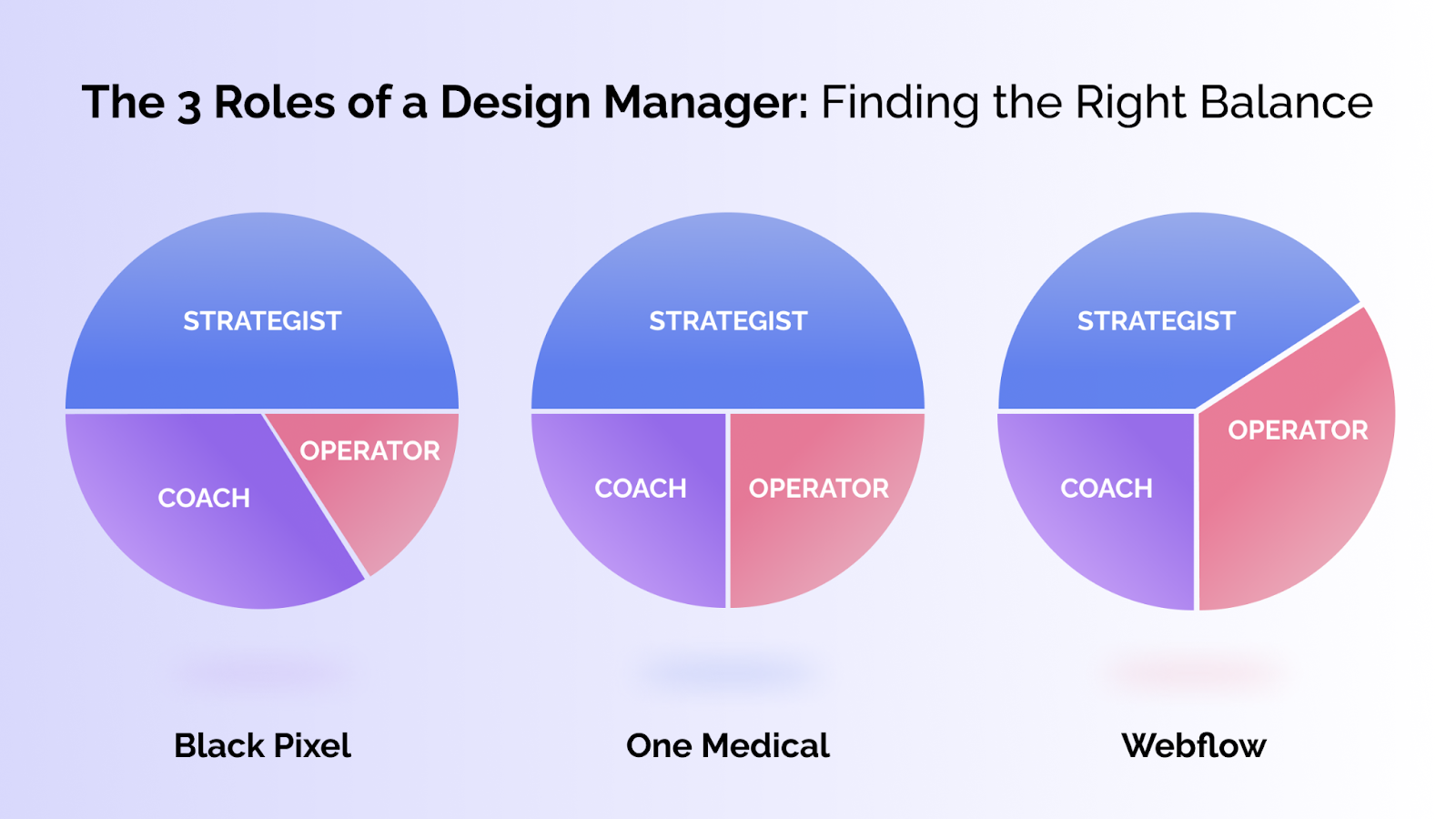
One of the chief challenges of being a design manager is fluidly moving between these three roles. A manager's responsibilities will change based on what the company needs at that moment.
For instance, if a company’s goals are well-defined and growth is one of them then a manager may find themselves in the operator facet more than the other two.Then when company growth stabilizes and it is time to define new goals, the manager will move into the strategist facet.
The trick is to balance these three responsibilities as they fluctuate as the company grows and evolves. For example, in my career I’ve had various design leadership levels based on specific needs:
- As a Design Director at Black Pixel, the majority of our work was client services. I was very involved as a strategist and doing the work while I mentored other designers
- My time at One Medical was growing the Product Design team in its scaling stage. As I led in strategy, I hired more designers and increased more of my time operating the team and being a coach
- At Webflow, I don’t even edit Figma files, and the majority of my time is operating the team and working with the management team
“Management is a point of no return” (and other myths about becoming a design manager)
A great manager needs to be a strategist, an operator, and a coach, but what does a great manager not need to be?
There are some widespread misconceptions about what it means to be a design manager. I am going to cover the five myths that I believe are the most problematic.
Myth #1: Becoming a design manager is a point of no return
One very common myth is that once you become a manager, you can’t go back to an IC. This is untrue and can be counterproductive.
Management in tech is littered with people in the role who didn’t receive enough training and support or felt forced to step into the role. I have switched between being a manager and IC throughout my career. It might feel like an ego hit at first when you go from a manager to an IC, but it should not.
Myth #2: Design management is only about supporting people.
While the best managers go into management because they care deeply about people, supporting others is just the tip of the iceberg. Design management is also operations, administration, and accountability. Coaching is not the only aspect of the job.
Myth #3: You need to become a design manager to move up in your career
This might be true for some companies — but not all.
In fact, the industry is evolving separate parallel career paths for both managers and individual contributors. Many companies have ways for designers to remain individual contributors as they level up, while also being able to receive compensation and exercise influence on the same level as a senior manager.
For instance, at Webflow, the Principal Designer role is leveled the same as a Senior Manager role and allows for a similar compensation and similar level of influence within the company. Leadership and management, while often tied together, are not mutually exclusive.
So in deciding which path to choose, ask yourself:
- Where would you like to have the most impact?
- Do you want to contribute to specific projects or do you want to have an impact at the company level?
- What gives you the most gratitude?
Myth #4: Design managers are the best designers on their team
Not only is it not true that designer managers must be the best designers on the team — they also shouldn’t be.
While there is a certain level of skill and comprehension that you should have as a design manager to lead your team, the goal is to make every designer on your team their best — not to be better than them at what they do.
Some of the best coaches in NBA history, for example, were not hall-of-fame players; but they were knowledgeable, they knew how to motivate talent, and they had enough experience to lead.
Similarly, while you will need to draw from your core skill set as a designer in order to evaluate and critique your employees’ work, that doesn’t mean you need to be the best designer on the team.
Myth #5: Design managers don't care about design anymore
While it may be true that you are pushing pixels less as a design manager, you are ultimately accountable for everything that your group creates.
Part of the job of being a design manager is coaching employees on their designs and helping them improve as designers. Your framework for approaching and executing designs will serve as a model for your employees.
Here’s what Cara, an Coho Design Fellow, had to say about her career path after having gone through the Coho Design fellowship: “
Skills that carry over from design & new skills to build
Becoming a design manager does not mean starting over from scratch. Even though you will be making fewer individual contributions to design work, the skills you have honed during your time as a designer will serve you as a manager. Examples include:
- Foundational design skills: The foundational skills of research, empathy, experimenting, gathering feedback, and iterating also apply to managing a team
- Empathy and active listening: This skill set becomes particularly important when it comes time to coach your team during 1:1s as a coach, and also in helping you understand customer needs as a strategist
- Iteration and experimentation: These are key to developing a good design workflow. Even the most successful managers will not get everything right on their first try; iteration is essential to incrementally improve your management processes
- Storytelling: Storytelling humanizes the personas we design for, building empathy and perspective in a human-centric way. Powerful stories are essential to keeping your team motivated and inspired.
- System design: Your work with leaders on org design as a manager will be similar to the way you’d work with an engineer on architecting large-scale,complex systems in the past as a designer
But while you can certainly utilize many of the skills that you have developed as a designer, you will also have to build new management skills to succeed as a manager. For example:
- Leadership communication: As a manager, you’re balancing downstream communication with your direct reports, cross-functional communication with other peer managers, and upstream with execs and stakeholders. This requires different modes and strategies of communication that you may not have experienced as an individual contributor
- Coaching and developing people: My belief is you want designers to thrive in their career, beyond their tenure with you and exceeding you in every way. If there is no career ladder, that is something to put in place immediately and continue to refine. From the first 1:1 together to the last, coaching is a daily activity.
- Delegation and expectation setting: As an individual contributor, it’s likely you don’t have much of an option to delegate work to others. As a manager, it’s your primary objective to hand off responsibilities for your team and set clear expectations for them to own.
- Assessing talent and hiring: Though you may have been involved with interviewing as a designer, understanding the scope of being a hiring manager, attracting talent, and striving to build diverse teams is a new endeavor as you step into management
- Autonomy: Taking initiative by managing or creating your own projects that address core needs of your business. Managers need to be able to identify these opportunities based on customer feedback or strategic directions.
Is design management right for you?
The truth is that while design management can be a fulfilling career path, not everybody will be happy in the role.
This is okay. Management should not be the only way to advance in your career, and individual contributors have a path forward as well. Later on I will talk about strategies for advancing your design career in different ways, but in the meantime I invite you to take some time to reflect on whether design management is the right choice for you.
Before you read my take on the following questions, reflect and answer each one for yourself. Jot down your answers or type them into a document and refer to them as you go through the rest of this article.
- What areas of design management do I care about most, and what gives me the most energy?
- What part of my work makes me the happiest? What parts do I care less about?
- Who are my mentors and what can I learn from them?
- How involved do I want to be in the design work? Would I be okay with designing not my primary focus or would I miss it?
Ok, have you thought about and answered these questions for yourself? When you are ready, read on to learn more about which career path, whether in design or design management, is right for you.
- Do you like generating ideas and executing a design for a particular project or do you like to have input across projects to ensure consistent vision and quality? If you are happiest in the weeds plugging away at a particular design project, continuing the IC path might be the most gratifying for you. If you enjoy setting strategic directions, contributing across projects, and supporting others in their work then you may be suited to design management. Play to your strengths. Your role as a design manager is to ensure everything in your scope of responsibility is done well, not that you personally have to be good at things. Playing to your strengths and leveraging the strengths of others will yield the best outcomes.
- Do you have a design manager at your company that you are comfortable talking about career advancement? What can you learn from their career progression to apply to your own? A lack of mentorship does not mean that you are not cut out for design management, but it may mean that it is more difficult to get on the management track..perhaps at your current company. If you do not have a mentor you can draw from and bounce ideas off of, do you have the bandwidth and desire to put in the extra work required to make your case for design manager?
- Do you enjoy sitting with executives all day and debating and arguing about resourcing and never be attuned to what your team is doing? Or, do you want to be closer to the work sitting side-by-side with the people I am managing? Your answer to this question will help you map out and define your design management role (or even signal that you might want to advance as an individual contributor). For instance, if you prefer to be closer to the design work you may want to manage a smaller team whereas if you want to be closer to department-wide operations you may want to be sitting with those executives.
Although this article details what a design manager is and how to become one, as mentioned above in myth # 3, keep in mind that becoming a design manager is not the only way for you to advance your career as a designer.
In the next section I’ll help you develop a game plan for advancing your career, whether as an individual contributor, or in pursuing a design manager role.
Building your career roadmap
This section covers your potential as a manager, the case for management in your current role (or beyond), and how to build your portfolio.
Would I be a good fit for management?
Like many things in life, there is no way to know you’d be a good fit for something until you try it. However, in my experience there are certain attributes and behaviors that demonstrate manager potential:
- Keith Rabois, one of the most renowned operators in tech, talks about looking at who people come to for help in the office as a good heuristic for management material. When people seek you out to help unblock and help them, that’s a great sign as a manager
- The time you spend coaching and training other designers delivers more value than you contributing to the work yourself
- People are vulnerable around you because they know you care and feel safe.
How to make your case for a design management position
The number one mistake people make in their efforts to become design manager is not letting their organization leaders know that they’re interested in the role.
That said, leaders’ abilities to offer you a design manager role will be contingent on if management opportunities are available. For instance, if the team only has three designers there may not be a value add from a design manager for that team.
However, even if something like this is the case, maybe there is a larger team at your organization or a team that is positioned for growth? To make your case for design manager, you will need to identify these opportunities within the company or look for opportunities outside your company if none exist within.
What to consider when talking to organization leadership about your management interest:
- What motivates you as a manager?
- Why would you make a bigger impact as a people manager vs. an individual contributor?
Remember that you’re in the driver seat of your career path. Build your own career development plan in addition (or in absence) of what your manager gives you.
How to create a design management portfolio
One question I often get is, “What does a design manager’s portfolio look like?”
In reality, the answer is “not much different than an IC portfolio”.
- Both provide case studies of the impact you’ve made.
- As a manager, your team and organizational impact are the results you share instead.
- Since you’re not showing pixels you’ve designed, the key is articulating how you understood the problem, company goals, and provide clarity for your team to achieve their goals.
When a hiring manager is reviewing your management portfolio, they should have a sense of how you lead humans, your business acumen, and the systems you put in place to ensure high quality work is done.
How to level up as an individual contributor
Through the earlier reflective exercise, you may have discovered that management is not for you, and that is okay.
Here are some steps that you can take to advance in your career as an individual contributor.
Step 1: Enhance Your Portfolio
Garnering recognition and earning coveted raises is dependent in large part on how you sell yourself. Tuning your portfolio is a great way to set yourself up for a conversation with your supervisor about a potential raise or promotion within your design team.
As you continue to progress in your career as an individual contributor, the focus will be on mastery and impact at the company level. Your portfolio should reflect the depth you have in a particular area and be framed on the impact and influence you have on projects at a higher level.
Step 2: Create Opportunities for Recognition
Perhaps you can do exemplary work, but you may still fly under the radar if you are having trouble getting your work out there and recognized throughout your company. Here are some concrete strategies that you can use to help broaden your reach and communicate your contributions to your team and beyond.
- Set up demos to make your work visible that your team and stakeholders can attend. This can be as simple as recording a Loom of how you’re thinking of work. You’d be surprised how viral these can go to broaden recognition
- Create tools and resources to help your peer designers do better work
- Finally, the best way is being recognized for your impact through peer feedback. When your fellow designers give you praise for your leadership and you have that trust, that’s the best evidence for your candidacy for management
Step 3: Talk to your manager about advancement opportunities
Talking to your manager is an important step in increasing the recognition you receive for your role as well as for getting opportunities to do fun, interesting, and challenging projects.
Through my own experiences I have developed a framework for navigating these conversations by asking myself the following questions in advance:
- What is my superpower should I double down on?
- Are there stretch opportunities for me to grow new skills with close guidance/mentorship? (ex: hiring, etc.)
- Where can I be a fly on the wall and learn through observation of leaders in action?
The management growth track
Design management is galvanizing humans towards a shared mission while developing their professional and personal growth. You will make a great design manager if you enjoy focusing on the progression and growth of other people. I discovered that this is one of the greatest joys that I get from management.
If you find that—like me—you enjoy management, you can look towards career advancement opportunities at senior manager, director, and finally executive level (VP or C-Suite). You might find yourself expanding in other areas of responsibility laterally. As some design leaders grow, they might take lateral responsibilities and lead product as well. Design management can lead to more expansive opportunities.
There is no set single pathway from designer to manager, and that’s exciting. Remember that ultimately you’re in the driver seat of your career journey. What I have outlined here is based on my own experiences with the transition, but it is by no means exhaustive or linear. Talking with your manager or another mentor at your current firm is a great way to understand how you can chart your own path from designer to manager or how you can advance as an individual contributor.
If you’re looking to diver deeper into Design Management, consider applying to the Coho Design fellowship to learn, connect, and level up with the best designers in tech.
Gordon Ching began his career in marketing, but at a new company he pivoted to product design as an individual contributor and then became design lead within a year. He joined the Coho Design Fellowship to help him get up to speed on design leadership and establish connections with fellows tackling the same issues as he is in his new role. Coho proved to be a game-changer. Here’s his story:
My transition from marketing to design
I’ve been deeply drawn to tech ever since my dad gave me my first iPhone 3G. If you told me then that I would eventually work in the marketing department at Apple, I wouldn’t have believed you. Yet I did.
But after six years in marketing, most recently at Apple, I pivoted to combine my love for building brands and experiences with the world of UX and product design. I made the switch from marketing to design because I recognized that the future will increasingly be led by companies who have a brand and design ethos in their DNA.
It occurred to me that both marketing and design are about brand identity and expression — except that as a designer, I have the power to directly bring the ideas I envision to life. I was the creator, not just the storyteller. It’s a game-changer.
When, within a year, I was promoted to design lead I realized I had the opportunity to help shape design as an organization within the company. I'm not new to leadership and management. But from a design point of view, I'm new, and I moved into design leadership quickly. I felt I needed to convey the self-confidence that I had the ingredients to be successful in the new position.
I soaked up knowledge from mentors, articles, and colleagues. But I also hit a ceiling when I realized I lacked a larger, trusted network of peers to relate to and be comfortable enough to ask hard questions and find insights.
Why Coho?
In my new design leadership role, these questions kept me up at night: How do other design leaders do it? How do they succeed in their jobs? Where do I go to ask questions that I don’t want to ask my colleagues?
Fortuitously, I stumbled across the Coho Design Fellowship on LinkedIn through a post from Mindaugas, who at the time, was the Program Director. Time and time again, through chats with other designers, I wished there was a place where designers could come together to learn and level each other up beyond our day jobs. Coho is precisely that.
One of my anxieties before joining was around the time commitment, since I had a full-time job while simultaneously pursuing a master’s degree in design management at SCAD. It wasn’t easy to juggle Coho Design on top of my other commitments, but I was impressed by the level of communication, engagement, and genuine care from the Coho team. I was able to partake in most live sessions. But if I missed any, I was able to watch recordings on my own time through the membership platform.
I had initial fears that Coho Design would hurt my focus at work, but what I found instead was an extra layer of stimulation to help me see problems in a new light and enrich my own discussions with my manager and teams. For example, it gave me the confidence to explicitly express that I was interested in a people management career path to my manager.
Coho provided a setting where I could ask hard questions and be supported by like-minded peers. I’ve met new friends who are working on similar things and encountering similar problems. It is a great way to leverage each other's wisdom and expertise. It is an incredible community where I learn, ask questions, get support, and build deep connections to help my career.
The unexpected benefits of Coho
When I joined, I saw the caliber of fellows who were already part of the program on the landing page. But what was unexpected was how incredible the speakers were; the sheer number of them plus their level of expertise. Many of the speakers I already followed, but now they were available in an intimate chat where I could access their insights directly.
Through the speaker talks, I was also able to identify other fellows to connect with one-on-one. Someone would ask a question during a session that would resonate with what I was thinking about, so I would proactively connect with them and get to know them on a deeper level.
I had a few such conversations with a fellow who was a senior product designer at an early-stage startup. I shared with her my journey becoming a design lead and my thoughts on the skills that separate leads from seniors. She soon realized she could become a lead herself. Within weeks, she was promoted. It felt great knowing I contributed in a small way and helped her recognize these values within herself.
Another fellow I spoke with managed to identify and articulate some of my key strengths (while I was giving him advice about his product). His insights were invaluable. This helped inform my value proposition for my design consulting side business.
I was building relationships through questions. And there were so many people, even beyond my assigned peer group, who had the same questions as me. This was not something I expected before joining the Fellowship.
Learning from top design leaders
Going through the fellowship, I wanted to get in the minds of design leaders and executives, understand what they went through to get there, and then work backward to plan my career. Maybe I don’t need to spend ten years climbing the ladder. Are there ways to close the gap faster? Maybe there’s a shorter path.
It was all about demystifying design leadership. How it works, how they got there, and then for individuals like myself, to work backward and think about what I need to do to make that journey happen.
In a session with James Vincent who worked at Apple before I was at the company, I learned how he thinks about the artistic side of building brands. It goes beyond just products and into storytelling and communications. Hearing his talk validated that I had already learned much of the core language from my extensive marketing background. It helped me bridge the gap between my former career in marketing to the product design world I’m in now with more clarity.
In a session with Designer Fund, Enrique, the guest speaker, simplified the business of design down to two key metrics: you’re either trying to save money or make money. In traditional design schools, they don’t teach much about the business side of design. Instead, you largely learn about art and design theory. Yet most designers live and operate in the business world. This talk helped me realize that not understanding the business side of design is a detriment to our careers and to the impact we can make as designers.
It's powerful to combine the different mindsets and disciplines from the fellowship, but also my identity and interests, to morph into who I want to be as a design leader.
The Direct To Experience Network
The Coho Design Fellowship is The Direct to Experience Network for working professionals who want to level up their design leadership abilities, their networks, and gain insider insights that you won’t learn as easily on the job, or in school.
Most of us in Coho Design already have a Bachelor’s degree and some even have a Master’s degree. Coho is an upgrade to the executive continuing education programs many universities have for practicing professionals.
Most educational programs today are curriculum-based. You show up for class and then you’re done. But Coho has a much more relationship-centric approach. It’s an important differentiator and part of why I continue to stay engaged with the fellowship.
Coho is a safe space to connect with a strong, tight-knit group of peers within your discipline. You also gain access to the wider talent network of other Coho fellows who have all gone through a similar fellowship experience. This is invaluable and makes it easier to break the ice when you reach out to new people, even if they’re from outside your discipline. People join Coho because they want to create relationships and grow themselves. As a result, you have infinite opportunities to connect with fellows from design, as well as from regional hubs and across other fellowships.
Coho is a trusted network of warm connections.
Connect with me on LinkedIn or Twitter, where I write about product design and leadership.
To learn more about the Coho Design Fellowship, click here.